
Merge Video
Need to join a few phone clips into one video? This tool merges them in your browser: add your clips, drag them into order, pick an output size and it plays them one after another into a new recording with sound. Nothing is uploaded, so it works for private videos — the trade-off is that merging takes as long as the videos play.
- Free to use
- No sign-up
- Runs in your browser


Video merger
Video Editing Planner Pack
Printable video project planners: shot list, clip log with timings, storyboard sheets and an export settings reference.
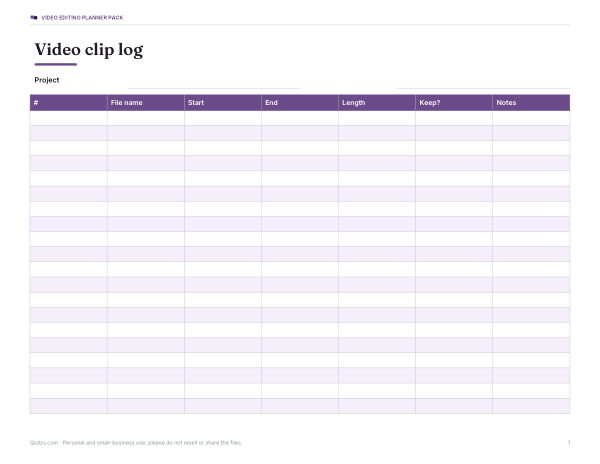
- Clip log (PDF/DOCX/XLSX)
- Shot list (PDF/DOCX/XLSX)
- Storyboard (PDF)
- Export settings (PDF)
Formats: PDF, DOCX, XLSX. Instant download after payment (link valid 72 hours, up to 5 downloads). AI-assisted: the templates were drafted with AI help and reviewed and laid out before publishing.
$5.00 USD, one-time 4 files · about $1.25 each
- Instant download
- 7-day refund
- Secure checkout by Stripe
7-day money-back guarantee. Full refund within 7 days of purchase, even after you download.
Free sample: Clip Log (PDF, 62 KB)
Full refund within 7 days — see the refund policy and license.
Free printables
Single sheets you can print right now, no sign-up. The full pack adds every sheet in one download plus the editable files.
 Printable Video Export Settings Chart
How this video merger works
- You choose clips from your device; they stay on your device.
- The tool reads each clip’s size and length and lists them in order.
- When you press Merge, it plays each clip in turn onto a hidden canvas at the output size, while routing the sound into the same recording.
- The browser’s built-in recorder (MediaRecorder) saves the result as a WebM or MP4 file, depending on what your browser supports.
- You preview and download the merged file.
Because it records in real time, a 10-minute set of clips takes about 10 minutes to merge. The tab needs to stay visible: browsers slow down hidden tabs, which would make the recording stutter.
Choosing the output size and fit
| Output | Best for |
|---|---|
| Same as first clip | Clips all from the same phone or camera |
| 1280 × 720 | Sharing, email, smaller files |
| 1920 × 1080 | Higher quality landscape video |
| 720 × 1280 | Stories, Reels, TikTok-style portrait clips |
| 1080 × 1080 | Square posts |
“Fit inside” keeps each whole frame with black bars where the shape doesn’t match; “Fill” crops the edges so the frame is always full. Mixing portrait and landscape clips always involves one or the other.
Formats: WebM vs MP4
Chrome and Edge on recent versions can record MP4 (H.264 video with AAC audio), which plays almost everywhere. Firefox and some older browsers record WebM (VP8/VP9 video with Opus audio), which plays in browsers, VLC, Android and most modern editors, but not always on iPhones or in older desktop software. If you need MP4 and your browser only produces WebM, a free desktop converter can change the container without re-uploading your video anywhere.
Worked example
Three phone clips from a birthday — 0:42, 1:15 and 0:28, all 1920 × 1080 — are added and reordered so the cake comes last. With “Same as first clip”, “Fit inside” and 30 frames per second, the merge takes about 2 minutes 25 seconds and produces one file of roughly the same total length. At about 0.12 bits per pixel per frame, that’s around 7.5 Mbit/s of video, or roughly 130–140 MB for the whole thing — similar to the originals.
Limits of browser merging
- Real-time recording: long videos take as long as they play.
- The quality is re-encoded, so it can be slightly lower than the originals, especially for fast motion.
- Clips must be in a format your browser can play — HEVC (H.265) videos from some iPhones won’t play in every browser.
- Very long or high-resolution merges use a lot of memory; for hour-long videos, desktop software is more practical.
- Mobile browsers may pause recording when the screen turns off.
Lossless alternatives for large jobs
If all clips share the same codec, resolution and frame rate, desktop tools can join them without re-encoding — which is instant and lossless. The free command-line tool FFmpeg does this with its concat demuxer, and most video editors (including free ones) let you drop clips on a timeline and export. Use this browser tool for quick, private merges of short clips.
Tips for a smooth merged video
- Trim unwanted starts and ends before merging, using your phone’s built-in editor.
- Keep all clips the same orientation where possible.
- Choose 30 fps for phone footage; 60 fps only if all clips were shot at 60.
- Close other heavy tabs while merging.
- Check the sound levels of each clip — a loud clip next to a quiet one is jarring.
Troubleshooting
| Problem | Try |
|---|---|
| No sound in the merged file | Make sure the clips have audio; some screen recordings are silent. Firefox and Chrome both record sound through the page’s audio system. |
| Choppy video | Keep the tab visible and in front, close other apps, or choose a smaller output size. |
| A clip shows as “can’t be played” | The browser lacks its codec; convert it to H.264 MP4 first. |
| The merge stops early | The screen may have slept or the tab lost focus; restart and keep the device awake. |
| File is larger than expected | Choose 1280 × 720 or a lower frame rate. |
Merging on a phone
Recent mobile browsers can run this tool, but phones are more likely to pause recording when the screen dims or you switch apps. Plug the phone in, keep the screen on and stay on this page while it records. For regular editing on a phone, the built-in photo or video editor on most devices can also combine clips.
Privacy
Your videos never leave your device. The tool uses your browser’s own video decoder and recorder; nothing is uploaded, and the merged file exists only until you close the page or download it.
Frequently asked questions
Are my videos uploaded?
No. Merging happens entirely in your browser.
Why does merging take so long?
The browser records the clips as they play, so it takes about as long as the total length.
Will the merged video be MP4?
In recent Chrome and Edge, often yes; otherwise it will be WebM.
Can I merge portrait and landscape clips?
Yes — choose an output size and either fit with black bars or fill by cropping.
Is there a watermark?
No.
Why won’t one of my clips load?
Your browser may not support its codec (for example HEVC); convert it to H.264 MP4 first.
Can I add music over the merged video?
Not in this tool — it keeps each clip’s own sound. Use a video editor to add a music track afterwards.
Is there a length limit?
No fixed limit, but long merges take as long as the videos play and use a lot of memory; for very long videos use desktop software.